21 Seamless Bead Patterns: A Practical Guide for Crafters, Designers, and Makers
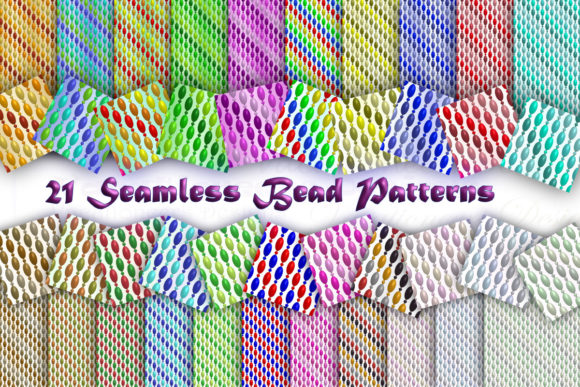
Whether you're hand-stitching a custom beaded clutch, designing digital textile repeats for print-on-demand fabric, or creating layered SVG overlays for laser-cut jewellery templates, seamless bead patterns are more than decorative flourishes — they’re functional design assets. The 21 Seamless Bead Patterns craft pack delivers exactly that: a curated, ready-to-use collection of multi-coloured, tileable motifs designed with real-world application in mind.
What Makes a Bead Pattern “Seamless” — and Why It Matters
A seamless pattern repeats infinitely in all directions without visible joins, edges, or misaligned seams. That means when you tile it across a surface — whether on screen or stitched onto fabric — the transition between copies is invisible. For beadwork, this quality is essential. Imagine applying a border around a beaded coaster: if the pattern isn’t truly seamless, you’ll see awkward breaks or colour mismatches at the corners. The same goes for digital mockups — non-seamless files create distracting visual noise in presentations or product renders.
The 21 Seamless Bead Patterns were built with precision tiling in mind. Each PNG file was manually tested and refined to ensure clean, natural repetition. No stretched pixels. No blurred edges. No guesswork required.
Why PNG Format Works Best for This Use Case
All 21 patterns come in PNG format — and for good reason. Unlike JPEGs, PNG supports transparency, which gives you full control over layering. Want to overlay a bead motif on a gradient background? Place it over a photo of hand-dyed silk? Blend it into a watercolour texture? Transparency makes it possible — instantly.
PNG also preserves crisp edges and colour fidelity without compression artefacts. That’s critical when scaling patterns up for large-format prints (think wall hangings or upholstery samples) or down for delicate embroidery guides. You won’t lose detail in fine bead outlines or subtle shading transitions — something JPEG often sacrifices for smaller file size.
And because PNG is universally supported across design software — from Adobe Photoshop and Affinity Designer to free tools like GIMP and Canva — there’s no barrier to entry. Whether you're a seasoned graphic designer or a beginner experimenting with Cricut Design Space, these files drop in and work right away.
How These Patterns Fit Into Real Creative Workflows
Let’s look at how the 21 Seamless Bead Patterns function in practice — not as abstract design elements, but as working tools:
- Hand-beading projects: Print any pattern at 100% scale onto transfer paper or use it as an underlay on a lightbox to trace precise placement guides for seed beads, delicas, or Czech glass.
- Digital textile design: Import into Procreate or Illustrator, adjust spacing and colour palettes to match your brand, then export as high-res repeats for Spoonflower or Contrado.
- Laser-cut templates: Combine patterns with vector outlines in LightBurn or Inkscape to generate intricate cut-and-etch designs for acrylic or wood bead frames.
- Surface pattern licensing: Use individual motifs as base elements in larger repeat compositions — ideal for designers building portfolios or pitching to stationery or home goods brands.
Each of the 21 patterns offers distinct rhythm and density. Some feature tight, geometric grids perfect for modern minimalist accessories. Others lean into organic clusters — soft-edged circles and overlapping ovals that mimic traditional peyote stitch layouts. There are even asymmetric variations that break predictability while still tiling flawlessly — useful for adding visual interest without compromising technical integrity.
Practical Tips for Getting the Most From Your Craft Pack
You don’t need advanced software to benefit from the 21 Seamless Bead Patterns. Here’s what works well, even with minimal tech experience:
- Start simple: Open one PNG in Canva or Google Slides. Duplicate it four times in a 2×2 grid. Zoom out — if you can’t spot where one tile ends and the next begins, you’ve confirmed true seamlessness.
- Change colours fast: In most editors, use “Adjustments” > “Hue/Saturation” to shift the entire palette. Try warm amber tones for autumnal jewellery mockups, or cool mint-and-slate combos for spa-themed accessories.
- Scale with confidence: Because these are raster files (not vectors), avoid enlarging beyond 200% of original size — but at standard craft resolutions (300 DPI), they hold up beautifully up to 12×12 inches.
- Layer intentionally: Place one pattern at 60% opacity beneath a bolder second pattern to create depth. This mimics how real beadwork catches light at different angles.
And remember: every pattern is multi-coloured out of the box — no need to recolour from scratch unless you want to. That saves hours during early-stage ideation, especially when testing concepts across multiple materials or client briefs.
Testing Across Environments — Because Real Tools Need Real Validation
We test each craft pack across multiple platforms and use cases before release — not just in theory, but in action. That includes opening files in older versions of Photoshop (CS6+), checking transparency rendering in web browsers, verifying tile alignment in Silhouette Studio, and printing physical swatches on both matte and glossy photo paper.
If you run into unexpected behaviour — say, a pattern appears slightly offset when tiled in your preferred app, or a colour shifts on export — that’s not user error. It may be a software-specific quirk we haven’t encountered yet. We encourage you to reach out. We’ll troubleshoot with you, provide alternate sizing or colour profiles if needed, and update the pack accordingly. Our goal isn’t just to deliver files — it’s to support your process.
Who Benefits Most From These 21 Patterns?
The answer might surprise you. Yes, beaders love them — but so do:
- Small-batch accessory designers who need consistent, ownable branding across earrings, pouches, and packaging;
- Educators creating downloadable worksheets for bead-weaving classes;
- SVG creators building layered cutting files for Cricut users;
- Interior stylists mocking up custom pillow covers or wallpaper accents;
- Students learning pattern theory, symmetry, and repeat construction in foundation art courses.
What ties these users together isn’t just skill level — it’s intent. They’re not collecting assets for the sake of it. They’re solving problems: How do I make a cohesive set? How do I speed up mockup time? How do I translate a tactile craft into scalable digital form? The 21 Seamless Bead Patterns answer those questions with clarity and flexibility.
Final Thoughts: Quality That Scales With Your Vision
Craft packs can feel interchangeable — until you try to use them. Then the gaps show: blurry edges, inconsistent spacing, mismatched hues, or tiles that simply refuse to align. The 21 Seamless Bead Patterns were made to eliminate those frustrations. Every pixel was placed deliberately. Every colour was balanced for versatility. Every file was verified for reliability.
They won’t replace your hands-on technique — nor should they. But they will save time, reduce trial-and-error, and expand what’s possible when imagination meets execution. Whether you’re sketching your first beaded cuff or preparing a wholesale line for Etsy, these patterns offer grounded, adaptable support — no fluff, no filler, just 21 thoughtfully engineered starting points.