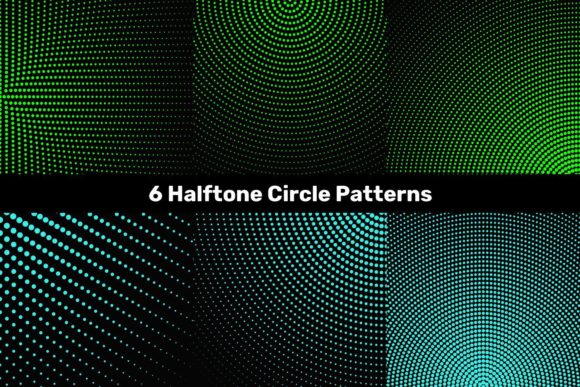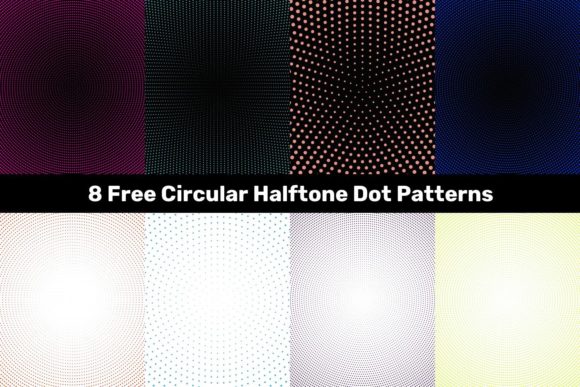
8 Free Circular Halftone Dot Patterns
Halftone effects—once the backbone of print reproduction—are experiencing a quiet but meaningful resurgence in digital design. What began as a mechanical solution for translating continuous-tone images into printable dots has evolved into a versatile visual language: nostalgic yet modern, tactile yet scalable, analog in spirit but fully at home in high-resolution screens and vector workflows. The 8 Free Circular Halftone Dot Patterns package meets this moment precisely—not as retro gimmickry, but as functional, production-ready assets built for today’s creative demands.
Why circular halftones—and why now?
Circular halftone patterns differ meaningfully from linear or elliptical variants. Their symmetrical, evenly spaced dots produce smoother tonal transitions and fewer moiré artifacts—especially important when layering over photographs, gradients, or textured backgrounds. Designers working across branding, editorial, apparel, and UI are increasingly turning to subtle halftone overlays not to mimic vintage printing, but to add depth, rhythm, and intentional imperfection. In an era saturated with hyper-polished, AI-generated visuals, a thoughtfully applied halftone can signal human intention—like a signature in the composition.
This shift reflects broader habits: professionals no longer treat texture as an afterthought. Whether it’s a marketing team building social-first assets, an educator designing accessible slide decks, or a freelancer preparing mockups for client review, layered visual hierarchy matters more than ever. A halftone pattern isn’t just decoration—it’s a tool for guiding attention, softening contrast, or unifying disparate elements. And because these patterns are circular and mathematically consistent, they scale cleanly across formats without distortion—a practical necessity in responsive design and multi-channel publishing.
What’s inside the 8 Free Circular Halftone Dot Patterns package
The package delivers exactly what creators need—no bloat, no licensing friction, no hidden limitations:
- 8 high-resolution JPG files (5000×5000 pixels), ideal for quick drag-and-drop use in photo editors, presentation tools, or web banners where vector support isn’t required;
- 8 vector EPS files, compatible with legacy and current versions of Adobe Illustrator, CorelDRAW, Affinity Designer, and most professional layout software;
- 8 native AI files, preserving layers, swatches, and editable dot parameters—so you can adjust spacing, size, or color directly within Illustrator without rasterizing.
Each of the eight patterns varies in dot frequency, density, and baseline tone—from ultra-fine grain suitable for delicate typography overlays to bold, high-contrast arrangements that anchor poster layouts. None rely on clipping masks or embedded rasters; all are built as true vector tile patterns or seamless repeats, ensuring crisp output whether printed on fabric or displayed on a 5K monitor.
Real-world uses across disciplines
These aren’t theoretical assets—they’re solving everyday challenges:
- Branding & packaging: A product label designer used one of the medium-density patterns to soften a vibrant background photo while keeping text legible—eliminating the need for opaque overlays or blurred gradients.
- Educational content: An online course creator applied a light halftone to infographic icons, giving them subtle dimension without competing with data points—resulting in higher learner engagement metrics across mobile devices.
- Social media assets: A small business owner layered a low-opacity halftone over flat-color Instagram story templates, adding tactile warmth that stood out amid algorithm-driven feeds full of uniform stock imagery.
- Print collateral: A freelance illustrator inserted a custom-sized halftone beneath hand-drawn line art in a limited-edition zine, achieving a cohesive “printed artifact” feel without costly spot-color separations.
Importantly, none of these applications required advanced technical knowledge. Because the patterns are pre-built and tested, users spend time refining intent—not troubleshooting scaling issues or pixelation.
How this fits evolving creative workflows
Modern design isn’t about choosing between speed and quality—it’s about removing friction between the two. That’s why format diversity matters. JPEGs let marketers insert texture into Canva or PowerPoint in under ten seconds. EPS files ensure compatibility with print vendors who still rely on older RIP systems. AI files empower illustrators to tweak dot radius or alignment mid-project—without exporting, reimporting, or losing editability. This flexibility mirrors how professionals actually work: fluidly moving between platforms, collaborators, and output requirements.
It also aligns with growing expectations around accessibility and sustainability in design practice. Vector-based halftones reduce file bloat compared to raster-heavy alternatives—leading to faster-loading websites and smaller email attachments. And because they’re resolution-independent, they eliminate the need to generate multiple sizes for different devices, cutting down redundant asset management.
Design integrity starts with reliable foundations
Free resources often carry trade-offs: inconsistent sizing, embedded watermarks, vague licenses, or outdated formats. The 8 Free Circular Halftone Dot Patterns avoids those pitfalls by prioritizing production readiness. Every file is verified at multiple zoom levels. All vectors are built using Illustrator’s Pattern Options panel—not traced bitmaps—ensuring clean paths and predictable tiling. Even the JPGs are saved with sRGB color profiles and minimal compression, so they retain fidelity when placed into larger composites.
This attention to detail reflects a deeper principle: respect for the user’s time and expertise. Whether you’re a seasoned art director reviewing assets for a global campaign or a student building their first portfolio website, you shouldn’t need to reverse-engineer a pattern just to use it. You should be able to trust it—and build confidently on top of it.
Getting started—practical next steps
You don’t need to overhaul your workflow to benefit. Try one of these low-lift integrations:
- For typography enhancement: Place a light halftone (e.g., Pattern #3 or #5) above a headline layer, set blending mode to Multiply at 15–25% opacity. Adjust until text feels grounded—not buried.
- For photo treatment: Apply Pattern #1 (finest grain) as a clipping mask over a portrait. Use luminosity blending to let skin tones show through while adding gentle texture to clothing or background.
- For icon systems: Import an AI file into your design system library, then use it as a fill swatch for shape layers. Scale uniformly—no pixelation, no manual re-tessellation.
- For presentations: Insert a JPG version behind a title slide, desaturate slightly, and lower opacity to 10%. It adds quiet sophistication without distracting from spoken content.
None require plugins, scripts, or tutorials. Just download, open, and adapt.
A resource that grows with your needs
Halftone patterns aren’t static artifacts—they’re flexible ingredients. As your projects evolve—whether you move from social graphics to physical signage, or begin collaborating with developers who need SVG exports—you’ll find these patterns hold up. Their vector foundation means you can convert them to SVG, CSS background patterns, or even CSS conic-gradient approximations with predictable results. They’re designed not as endpoints, but as starting points for iteration.
That’s the quiet strength of the 8 Free Circular Halftone Dot Patterns: they meet current needs without locking you into narrow use cases. They acknowledge that creativity is iterative, collaborative, and context-dependent—and that the best free resources empower choice, not constraint.
Download these great free designs and use them to create outstanding designs—not because they’re trendy, but because they’re well-made, versatile, and ready when you are.