Forest Patterns
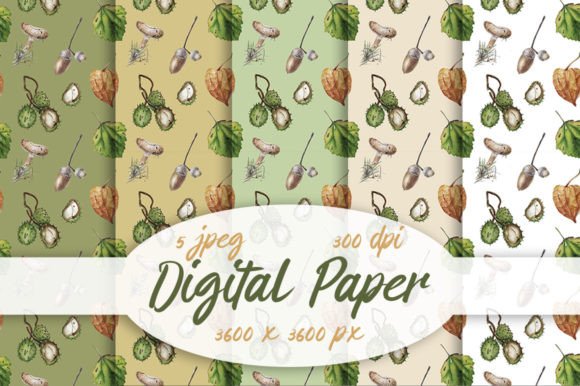
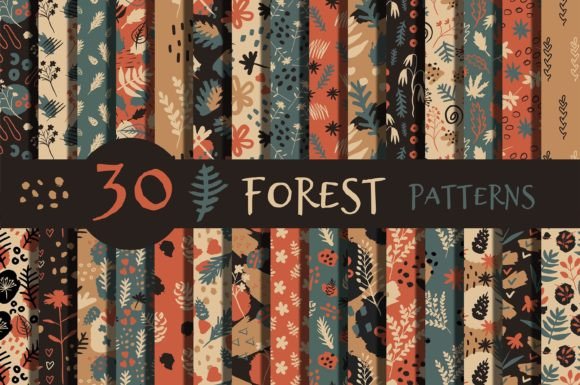
Forest Patterns is a thoughtfully curated decorative collection of hand-drawn botanical motifs—designed not just to look charming, but to work reliably across real-world creative projects. You’ll find abstract leaves, pine cones, delicate branches, seasonal flowers, organic doodles, scattered spots, and subtle dots—all crafted with intention and cohesion. Unlike generic clipart or overprocessed vector packs, this set prioritizes texture, rhythm, and seamless repetition, making it especially valuable for designers, crafters, and small business owners who need quality without complexity.
What People Often Overlook (and Why It Matters)
Many buyers assume “hand-drawn” means “ready for everything”—but that’s not always true. Forest Patterns includes 30 seamless patterns in both EPS and JPG formats, each sized at 4000 × 4000 pixels and rendered at 300 dpi. That resolution matters: if you’re printing packaging, fabric, or large-format stationery, low-res files will blur or pixelate. Yet some users download the JPGs alone and later realize they can’t scale or recolor elements without losing fidelity—because JPGs are raster-based and flat. The EPS files solve that: they’re editable vectors, ideal for adjusting colors, isolating motifs, or adapting layouts in Illustrator or Affinity Designer.
A common misstep? Assuming all 30 patterns will suit every season equally. While the collection is labeled “all seasons,” its strength lies in versatility—not uniformity. For example, a frosty birch branch motif reads beautifully on winter wedding invitations—but may feel out of place on a vibrant summer birthday banner unless paired intentionally with warmer tones or complementary florals. The key isn’t avoiding seasonal use—it’s pairing mindfully. Look at how motifs interact: does a dense fern pattern overwhelm delicate lettering? Does a sparse dot grid provide enough visual weight behind bold typography? Test at actual size before committing to print or web layout.
Where Usage Gets Tricky—and How to Navigate It
Forest Patterns works well for website backgrounds, but only when optimized correctly. Dropping a full 4000 × 4000 JPG directly into a CSS background property creates unnecessary load time—especially on mobile. Instead, export a smaller, compressed version (e.g., 1200 × 1200) using “Save for Web” in Photoshop or export settings in Affinity Photo. Keep the original high-res file archived for print needs, but serve lean assets online.
For textile or fabric applications, another nuance arises: repeat spacing. Seamless doesn’t automatically mean “ideal for fabric repeats.” Some patterns in Forest Patterns have tighter spacing—great for stationery or wrapping paper—but may create visual clutter on wide-width cotton or linen. If you’re screen-printing napkins or sewing tote bags, open the EPS in your vector editor and check the tile boundary. Adjust spacing manually if needed, or pair busier motifs with solid-color panels to balance density.
DIY crafters sometimes overlook color mode. The JPGs are RGB by default—perfect for screens and digital invites—but if you’re ordering professional print runs (like foil-stamped greeting cards or offset-printed packaging), ask your printer whether they require CMYK. You can convert the JPGs, but color shifts may occur. For best results, use the EPS files to re-output in CMYK from within your design software—giving you more control over ink behavior and saturation.
Realistic Use Cases—And What to Verify First
Let’s say you run a small candle brand and want to refresh your gift boxes. You love the pinecone-and-moss pattern—but before ordering a print run, verify three things: first, confirm the pattern repeats cleanly at your box’s panel dimensions (measure the height/width of each side and test tiling); second, ensure your printer supports 300 dpi raster files *or* accepts EPS for vector-based output; third, check contrast—will light-toned kraft paper make pale green motifs disappear? A quick grayscale preview helps spot legibility issues early.
Or imagine you’re designing a teacher’s classroom welcome banner. You choose a soft leaf-and-dot combo for spring. But instead of stretching the JPG to fill the banner width, resize it proportionally and duplicate the tile horizontally—preserving crisp edges and consistent spacing. Stretching distorts hand-drawn subtleties like uneven line weight or slight wobble, which actually give Forest Patterns its warmth. Preserving those details keeps the aesthetic authentic.
Before You Download or Purchase—A Quick Checklist
- Match format to function: Need to recolor or isolate elements? Prioritize EPS. Just applying as a background overlay on Canva or Word? JPG is sufficient.
- Check your workflow compatibility: Not all apps open EPS natively (e.g., Canva, Google Slides, or basic photo editors won’t). If you’re using those tools exclusively, stick to JPG—and plan for manual adjustments if scaling or cropping is needed.
- Review licensing scope: Forest Patterns is intended for both personal and commercial use—but double-check whether your specific application (e.g., selling digital templates *containing* these patterns) falls under standard terms. When in doubt, contact the creator directly.
- Test print one motif first: Especially for decoupage, scrapbooking, or handmade cards—print a single 4×6 swatch on your preferred paper stock. Notice how ink absorbs, how fine lines hold up, and whether contrast meets your expectations.
Finally, remember that Forest Patterns shines brightest when treated as a toolkit—not a shortcut. Its charm comes from imperfection: slight variations in line thickness, organic spacing, and seasonal nuance. That’s why it avoids feeling sterile or algorithmic. But that same authenticity asks for thoughtful application. Take five minutes to open one pattern in your editor, zoom in, and trace how the repeat flows. Try rotating a motif 15 degrees—or layering two patterns at 30% opacity. You’ll start seeing possibilities beyond the thumbnail: a branch pattern becomes elegant border framing; a cluster of dots transforms into subtle texture behind handwritten text.
Whether you’re launching a boutique stationery line, prepping for a child’s forest-themed birthday, or refreshing your blog’s sidebar graphics, Forest Patterns offers flexibility grounded in craft—not convenience. And that makes all the difference when what you’re building needs to feel human, intentional, and quietly memorable.